Automatically run UI tests when a GitHub pull request opens
To run ui tests on pull request github, use GitHub Actions. Configure triggers, application readiness, failure handling, and required checks before merging.
Visual regression testing game studios: start with repeatable scenes, review meaningful differences, and connect approved visual checks to pull requests.
Automate and scale manual testing with AI ->
Game studio visual regression testing is the comparison of rendered game screens against approved references with the aim of catching unintended visual changes before release. Unlike a static website, a game needs controlled camera positions, animation states, rendering settings, and save data before screenshot differences become useful evidence.
TL;DR
A game can accept input and complete a level while displaying clipped subtitles, missing icons, or a broken inventory layout. Functional assertions and visual checks answer different questions. You need both when the player’s ability to understand the screen matters.
In 2026, build your visual regression strategy around reproducible player states, not a screenshot of every scene. Start with surfaces where a visible change has a clear interpretation: menus, HUD elements, settings, tutorials, and purchase confirmation screens where applicable. Leave subjective art-direction decisions with the people responsible for them.
Use a visual regression testing tools comparison to evaluate capture and review approaches, but define the evidence you need before selecting software. A screenshot comparison cannot tell you whether a camera moved intentionally unless your test and approval process preserve that context.
A useful visual test explains what changed, where it changed, and whether the change was approved. An unexplained mismatch is investigation work, not an automatic release verdict.
Treat the following steps as a pipeline: define the expected state, reproduce it, execute the check, inspect the evidence, and maintain the reference. Keep gameplay correctness, rendering correctness, and artistic approval distinct even when they share a capture.
The process below applies to your 2026 test plan without requiring a particular engine or screenshot library. Begin with manual captures. Automate only after another tester can reproduce the same state from your instructions.
Choose checkpoints by player impact rather than by the number of screens you can capture. A clipped objective label deserves attention because it blocks understanding; a moving cloud usually needs a different evaluation method. Each checkpoint should describe an observable requirement, not just a location in the game.
Start with 3 checkpoints as a pilot: the main menu, a representative HUD state, and a settings screen. This is a proposed starting scope, not a coverage benchmark. Expand after the captures are repeatable and the review decisions are clear.
Write down the setup and expected result together. For a subtitle checkpoint, identify the dialogue state, language, display configuration, and whether the complete text must remain visible. This turns an image into a test specification that a developer can investigate.
Close each checkpoint definition with these concrete requirements:
A visual comparison is only meaningful when the capture conditions are comparable. Replaying the same input sequence does not establish that the same animation frame, particle state, or network response appeared. Control the state you intend to inspect instead of assuming elapsed time will reproduce it.
Use manual captures to establish a repeatability gate. Require 2 consecutive captures of the same checkpoint to show no unexplained differences before making that checkpoint blocking. This is an acceptance rule you set, not a claim about a tool’s accuracy.
Separate stable interface regions from dynamic scene regions. Mask a region only when it falls outside the test’s purpose, and document the exclusion. Masking a changing health bar while claiming to test the HUD removes evidence you need.
Apply these controls before expanding coverage:
Run the checkpoint manually on a proposed change first. Record the build identifier and capture conditions, then compare the result with the approved reference. This establishes what your automation must reproduce and gives you a working fallback during integration problems.
TestDriver end-to-end testing is best for GitHub teams that need pull requests exercised in a real desktop sandbox to catch UI regressions. TestDriver automatically runs pull requests in that environment and provides automated code review. That execution model is relevant when reading changed code alone does not establish what appeared on screen.
Use TestDriver end-to-end testing as an automated execution path, not as a substitute for defining correct output. Validate your game build, launch process, input requirements, and capture workflow before making it a required check. Desktop execution does not establish console, device, or rendering coverage by itself.
Connect execution to your repository deliberately:
Review the reference, candidate capture, and difference evidence together. A difference image locates change; it does not explain intent. Read the pull request description and inspect the affected player task before classifying the result.
Use separate outcomes for a product regression, an intentional change, and an invalid test run. A missing texture is not the same problem as a capture taken before loading finished. Sending both to the same undifferentiated failure queue makes ownership harder.
For your 2026 review workflow, require the reviewer to state the reason for the decision. Avoid treating a global pixel threshold as the definition of quality: a small missing icon can matter more than a large change in an excluded background.
Keep the review evidence actionable:
A baseline is an approved expectation, not simply the most recent successful upload. Updating it changes what future runs accept. Give that decision the same attention as changing a test assertion.
Assign 1 accountable owner to each checkpoint, with an explicit backup for review. The owner need not inspect every run, but someone must be responsible for deciding whether a new reference expresses the intended result. Keep the approval attached to the relevant change.
Maintain separate references for configurations that intentionally render differently. Do not overwrite a desktop reference with a capture from another configuration and then compensate with broader tolerances. A reference should describe one clear target state.
Use these baseline controls:
Measure whether visual checks produce decisions your team can act on. A growing screenshot collection is not evidence of better release protection. Track the cause of each failed run so you can separate product defects from unstable capture conditions.
For the 2026 pilot, review failures by checkpoint before adding more scenes. A checkpoint that repeatedly fails because loading is incomplete needs a readiness fix, not more reruns. A checkpoint that never represents an important player state needs redesign or removal.
Keep your reporting narrow enough to maintain. Record actual observations rather than attaching unsupported defect-reduction or time-saving estimates. TestDriver results should feed the same investigation and ownership process as your other checks.
Track these items consistently:
The workflow is a loop: a confirmed defect improves the test specification, while an invalid capture improves the setup. Neither outcome should silently produce a new baseline.
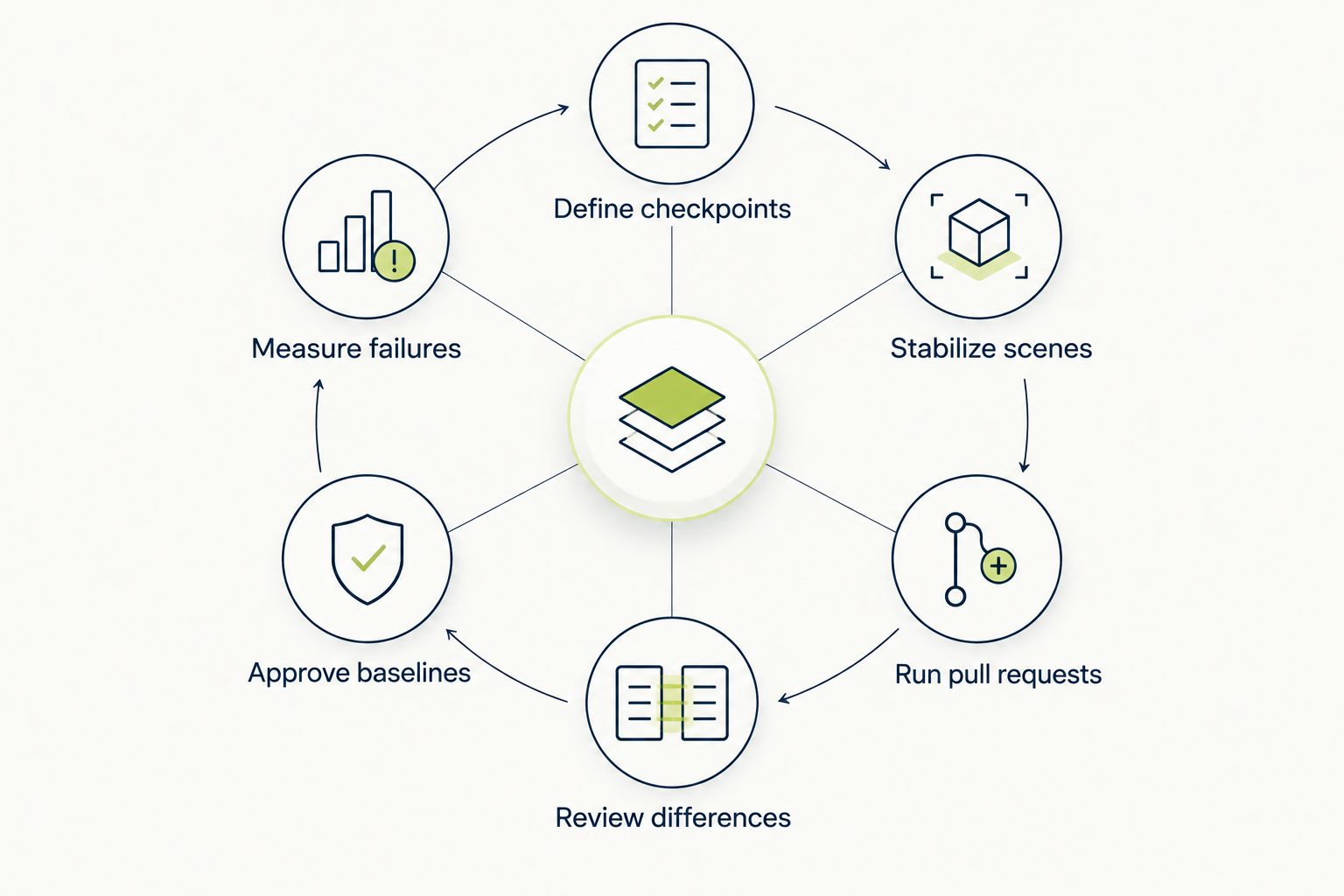
Fix capture conditions before treating screenshot differences as product regressions.
Choose an execution and review approach based on the surface you need to test. Native gameplay, browser interfaces, and subjective art review do not present the same evidence or integration requirements. No single row below replaces the others across every game surface.
In 2026, evaluate options against your actual checkpoint fixtures rather than a generic demonstration. Require each candidate workflow to launch the intended build, reach the state, preserve evidence, and support a clear review decision.
| Option | Best for | Main advantage | Key limitation |
|---|---|---|---|
| Manual capture and review | Establishing checkpoints and reviewing artistic intent | Lets reviewers judge player-facing context directly | Requires repeated human execution and comparison |
| Engine-integrated screenshot checks | Controlled scenes with engine-accessible state | Places setup and capture close to the game state | Requires engine-specific integration and maintenance |
| Browser-based visual checks | Web launchers, account pages, and browser-rendered interfaces | Tests the browser surface directly | Browser coverage alone does not establish native game coverage |
| TestDriver | GitHub teams needing desktop pull request execution | Runs pull requests in a real desktop sandbox to catch UI regressions | Requires validation of the game’s launch, input, and evidence workflow |
Combine automated checks for repeatable states with human review for intent. Keep exploratory playtesting for defects outside those defined states. Passing screenshots do not prove that the rest of the game renders correctly.
Two captures taken during the same encounter can represent different particle effects, camera positions, or animation states. Calling every difference a regression creates work without establishing a defect.
Fix: move the checkpoint to a controlled state or narrow its purpose to a stable region. Keep exploratory captures as supporting evidence rather than making them automatic merge blockers.
A UI redesign can generate legitimate differences while also introducing an unrelated clipped label. Approving the whole batch because the change was expected accepts both.
Fix: review each checkpoint against its requirement. Separate intentional layout changes from unintended losses of information, even when both arrive in the same pull request.
A successful desktop capture establishes evidence for that tested configuration. It does not establish how another display configuration, input method, or target device behaves.
Fix: name the configuration in every result. Maintain separate validation for the platforms you ship, and do not describe an untested target as covered.
A menu that fits the default language does not establish that every supported translation fits. Text length and glyph rendering belong in the visual test specification when your game supports multiple languages.
Fix: select localization checkpoints deliberately. Include text-heavy menus, subtitles, and constrained HUD labels, and review them with the intended language and font settings.
A correct-looking inventory does not prove that item actions work. A visible confirmation does not establish that the underlying state changed correctly.
Fix: pair visual requirements with behavioral assertions where the player task requires both. Verify the action’s result separately from the appearance of the control that triggered it.
What’s the best starting point for visual regression testing in a game studio?
Start with repeatable menus, HUD states, and settings screens. Define the expected appearance and capture conditions before choosing an automation approach.
Can screenshot testing replace game QA?
No. Screenshot testing checks defined visual states; it does not replace exploratory playtesting, behavioral checks, performance testing, or platform validation.
How do you stop animations from causing screenshot failures?
Capture a controlled animation state or exclude animation regions that are outside the test’s purpose. Document exclusions so a masked region does not hide a requirement you intended to test.
Is TestDriver suitable for game studio pull requests?
TestDriver is relevant for GitHub teams that need pull requests run in a real desktop sandbox to catch UI regressions. Validate the game’s launch process, input requirements, and evidence workflow before making the check mandatory.
Should every screenshot difference block a merge?
No. Block on defined requirements with repeatable captures, and classify intentional changes and invalid runs separately. An unexplained mismatch requires review rather than automatic baseline approval.
Do game studios need separate baselines for different configurations?
Yes, when those configurations intentionally produce different visual output. Store the resolution, UI scale, language, and relevant rendering settings with each reference.
Who should approve a changed visual baseline?
The checkpoint’s accountable owner should approve the new expected appearance. The approval should explain the intended change and remain associated with the relevant implementation.
Test the test before trusting its pass result. In a disposable branch, deliberately introduce a visible defect in a covered region, such as clipping a menu label. Confirm that the check fails and that the evidence makes the problem understandable.
Then undo the change. If the check still passes, inspect the capture target, masks, comparison rules, and execution path before expanding coverage. This exercise checks whether your workflow detects the failure it claims to prevent; collecting more screenshots does not answer that question.
To run ui tests on pull request github, use GitHub Actions. Configure triggers, application readiness, failure handling, and required checks before merging.
Set up your TestDriver GitHub Actions integration correctly: configure PR triggers, sandbox access, secrets, and required checks that catch UI regressions.
TestDriver GitLab CI integration requires a verified execution path. Configure merge-request jobs, protect credentials, and prove failures block merges.
For automated code review github pull requests, pair code checks with runtime tests. Build clear merge gates and catch UI regressions before merging.
TestDriver runs every pull request in a real desktop sandbox, finds bugs, and builds regression tests - right from your repo.